
Please enable the Legacy API.
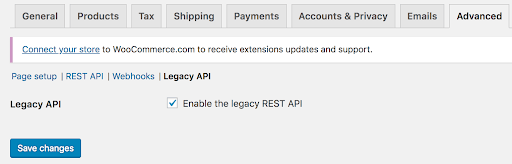
To activate the legacy REST API in WooCommerce, navigate to WooCommerce > Settings > Advanced > Legacy API and mark the checkbox for “Enable the legacy REST API”
Note: Before WooCommerce 3.4, the legacy REST API could be accessed at WooCommerce > Settings > API.
REST API endpoints (both accept GET and PUT requests):
/wp-json/wc/v3/products/id
/wp-json/wc/v3/products/id/variations/id (first ID is for parent product, the second one for the variation ID)
/wp-json/wp/v3/locations/
/wp-json/wp/v3/locations/id
Get Postman Collection

Example –
API Endpoint – /wp-json/wc/v3/products/1033
{
id: 1033,
name: “Bucket/Pail, 5 Gal, White, Industrial Storage, Price Container 8207”,
meta_data:
[
{
id: 27959,
key: “wcmlim_stock_location_43”,
value: “100”
},
{
id: 27961,
key: “wcmlim_stock_location_44”,
value: “100”
},
{
id: 27963,
key: “purchase_price”,
value: “”
},
{
id: 27964,
key: “wcmlim_regular_price_43”,
value: “35”
},
{
id: 27965,
key: “wcmlim_sale_price_43”,
value: “”
},
{
id: 27966,
key: “wcmlim_regular_price_44”,
value: “45”
},
{
id: 27967,
key: “wcmlim_sale_price_44”,
value: “”
},
],
],
}
}
These are the Parameters returned for the Stock Locations :
Stock at Location
{
id: 27959,
key: “wcmlim_stock_location_43”,
value: “100”
}
Regular Price for Location
{
id: 27964,
key: “wcmlim_regular_price_43”,
value: “35”
}
Sale Price for Location
{
id: 27964,
key: “wcmlim_sale_price_43”,
value: “25”
}
Example –
API Endpoint – /wp-json/wp/v2/locations/44
Response –
{
id: 44,
count: 4,
description: “”,
link: “http://yourwebsite.com/locations/new-york/”,
name: “New york”,
slug: “new-york”,
taxonomy: “locations”,
parent: 0
}
locations:
[
317 : {
wcmlim_stock_location_43 :100,
wcmlim_regular_price_43 : 35,
wcmlim_sale_price_43 : 30
wcmlim_stock_location_44 :100,
wcmlim_regular_price_44 : 35,
wcmlim_sale_price_44 : 30
},
318 : {
wcmlim_stock_location_43 :200,
wcmlim_regular_price_43 : 45,
wcmlim_sale_price_43 : 40
},
]
WooCommerce Rest API Documentation:
Here is the link where you can find more about woocommerce REST API:
https://woocommerce.com/document/woocommerce-rest-api/
This allows you to manage inventory at multiple physical locations (e.g., warehouses or store branches) using dynamic meta keys.
Each location’s stock is tracked using a custom meta key format
wcmlim_stock_at_{location_id} : This meta key field is used to set or retrieve stock for that specific location.
Below is the custom meta key format:
Method: PUT
Endpoint: /wp-json/wc/v3/products/410
Payload:
{
“meta_data”: [
{
“key”: “wcmlim_stock_at_34”,
“value”: “10”
}
]
}
This sets the stock for Location ID : 34 to 10 units for Product 410.
On success, Woocommerce will return the updated product, including the custom meta field. (Below is the updated product).
“meta_data”: [
{
“id”: 410,
“key”: “wcmlim_stock_at_34”,
“value”: “10”
}
]