
- After enabling this feature, whenever a “Guest Customer” places a sales order, a new customer will be generated in QBO.
- After enabling these options, manually export sales orders to QBO.
- If you want to sync the user’s first and last name instead of their username, check this box. By default, Username syncs to Quickbooks as Customer Name.
- If you want to add a prefix to your Order Number in Quickbooks, turn this on.
- If you want to use Quickbooks’ default invoice number (incremental), select this option.
- Enable this option if you want users to see a Download Invoice button on the frontend.
- COGS -Here you must enter the COGS field meta key. After enabling this setting when you export the product the sale price of that product is transferred to the “Cost” column in the QBO.
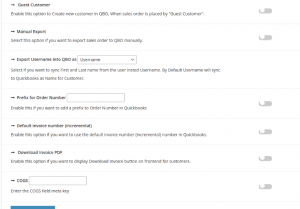

Image 17