
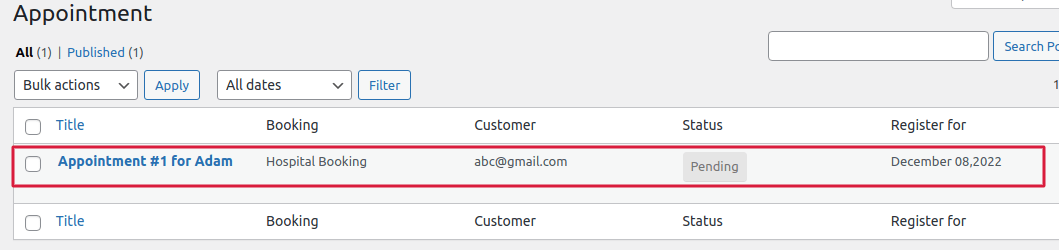
Go to Booking Management > Appointment > Admin can receive the new appointments in this section with booking details as shown in below image.
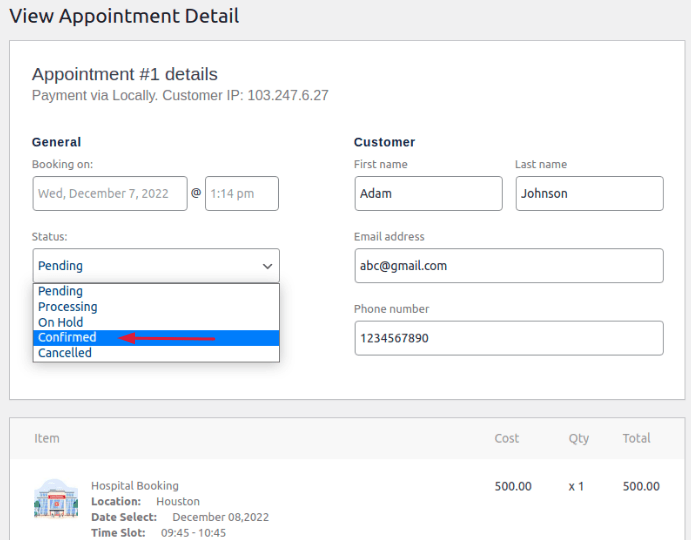
When you open the appointment, the booking information is shown. Admin can also alter the appointment status at any moment. To confirm the appointment, select the confirmed option to update the changes.
The admin can send the customer an email regarding the appointment or booking update by using the Action column.
Email Notification :
- Appointment details to customer – If the admin wants to send the appointment details to the customer over the mail then select the “Appointment details to customer” option and click on update. After that customer will receive the booking update of it appointment over email. For instance, if you want to confirm an appointment, choose the confirmed status and click update. Choose “Appointment details to customer” from the action column, then click “update.”After the customer will receive the email and gets notified the booking is confirmed
- Resend New appointment Notification – Select this option, then click update if the admin decides to cancel the appointment or wants the user to make a new one. The customer will then be informed that his appointment has been canceled.