
Simple Products:
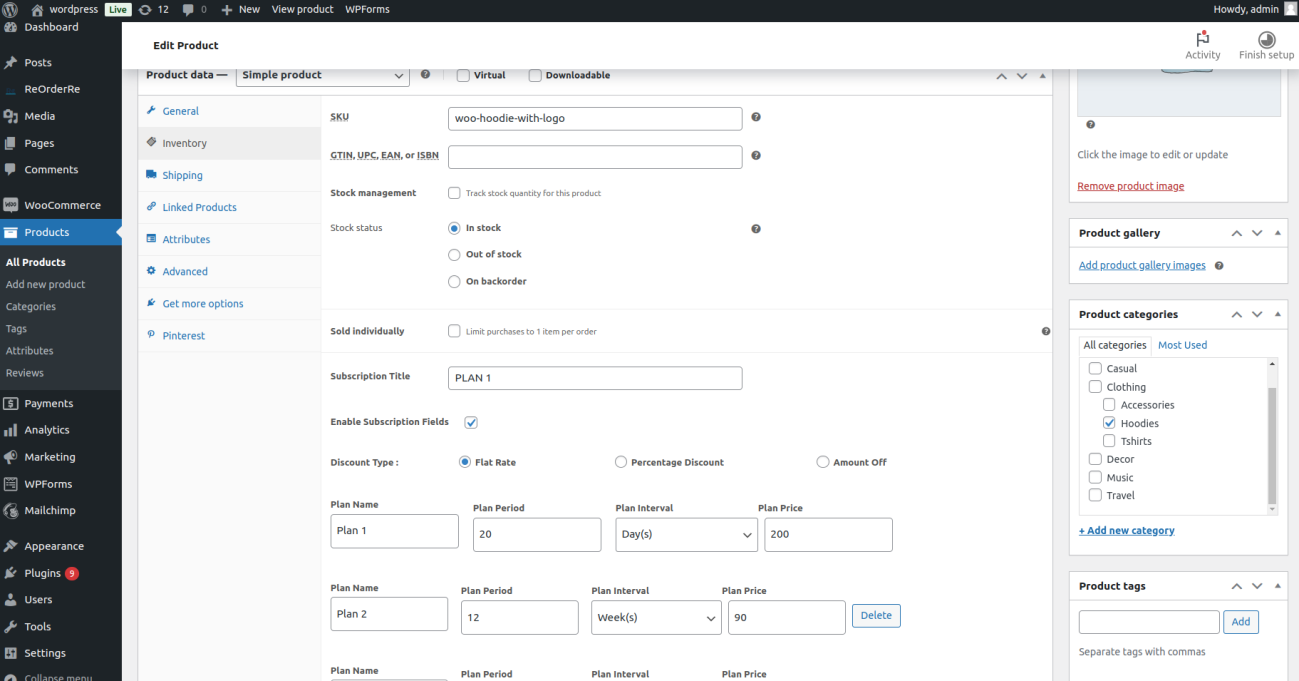
To set up subscriptions for simple products, follow these steps:
1. Navigate to the product edit page in your WordPress dashboard.
2. In the inventory tab, enable the subscription field.
3. Choose a discount type (flat rate, percentage, or specific amount) for the
subscription.
4. Add Plan Details:
a. Plan Name: Enter a name for the subscription plan.
b. Plan Period: Define the duration of the plan (e.g., weekly, monthly).
c. Plan Interval: Set how often the subscription renews (e.g., every day,
week, month).
d. Plan Price: Enter the price for the subscription plan.
5. By clicking on “Add More,” you can create additional subscription plans with
varying details.
6. View Options: Once the product is set, depending on the view selected from
settings, you’ll see different plan views (horizontal card view, card view, list view
with radio buttons, inherited list view with radio buttons) for your subscriptions.
Variable Product:
To set up subscriptions for variable products, follow these steps:
1. Navigate to the product edit page and go to Variations.
2. For each variation, add a subscription title.
3. Choose a discount type (flat rate, percentage, or specific amount) for the
subscription.
4. Add Plan Details:a. Plan Name: Enter a name for the subscription plan.
b. Plan Period: Define the duration of the plan (e.g., weekly, monthly).
c. Plan Interval: Set how often the subscription renews (e.g., every day,
week, month).
d. Plan Price: Enter the price for the subscription plan.
5. By clicking on “Add More,” you can create additional subscription plans with
varying details for each variation.
6. Depending on the view selected from settings, you’ll see different plan views
(horizontal card view, card view, list view with radio buttons, inherited list
view with radio buttons).