
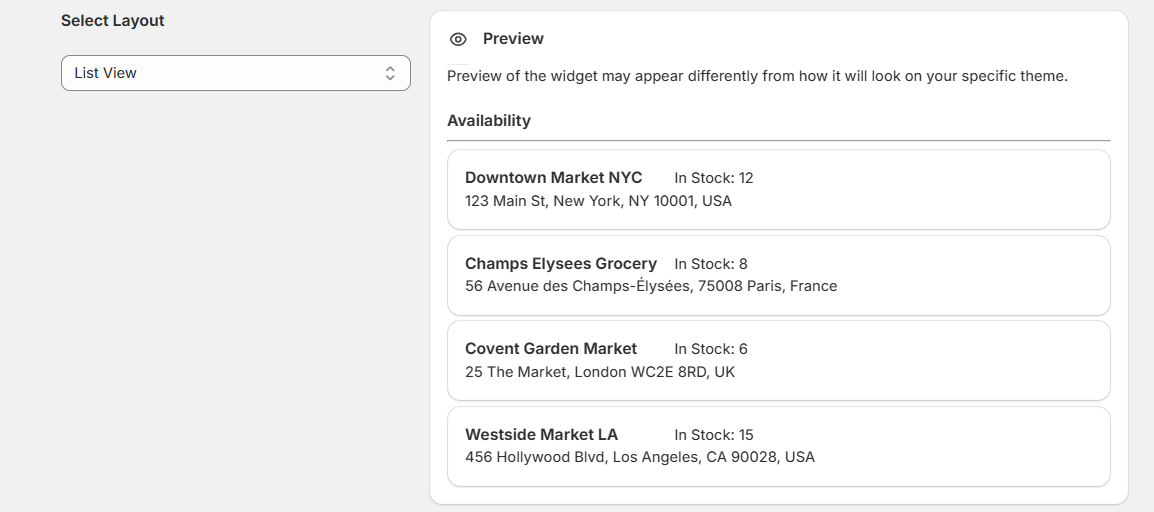
On the left side of the interface, you’ll find a Select Layout dropdown menu. This allows you to choose how your widget will display the information. The available layout options include:
- Basic View: Simply displays items in a vertical list format, without margin.


- List View: Displays items in a vertical list format, showing one item per row.

- Expand View: Display detailed availability information for each location, including stock, address, and contact details.

- Two Columns: Splits the display into two columns, showing items side by side.

- Three Columns: Displays items in three evenly spaced columns, optimizing for a grid-like layout.

- Grid View: Creates a uniform grid layout, ideal for compact visualizations


Drawer View: Display location details in a compact, collapsible drawer interface.

Enable Google Ratings and Timings
At the top, there’s a master toggle (a checkbox) labeled “Enable Google Ratings and Timings.” Below that, under London Store, there’s a text field labeled “Google Place ID for London Store” where you can presumably enter the Google Place ID associated with that store location.
To enable this feature, you must provide your Google Maps API key.(Fulfilment and Geolocation page)
Beneath the text field are three checkboxes:
- Enable Google Ratings – This would allow the store’s Google ratings to be displayed or utilized.
- Enable Google Timing – This would automatically pull business hours from Google if configured.
- Enable Custom Timing – When checked, it reveals a table where you can manually set (or override) the store’s open and close times.
The table lists each day of the week (Monday through Sunday) and provides:
- A Closed checkbox (if selected, the store is considered closed all day).
- Open time fields.
- Close time fields.
You can select the checkbox for each day if the store is closed, or enter specific opening and closing times. There’s also an option at the bottom labeled “Apply these timings to all locations,” which (if clicked) likely applies the same day-by-day schedule to other store locations.
Below this table, there is another section for Los Angeles, suggesting you can configure separate Google Place IDs and timings for multiple store locations within the same interface.
