
On the first business day of November, a controller at a 40-person distributor exports the same three files she exported in October: stock by location from the warehouse system, orders by channel from Shopify and Amazon, and the ledger. Reconciling them takes two days and produces a number nobody fully trusts.
A cloud ERP system is what she is being sold to end that. The pages ranking for the phrase explain the noun and stop: two of the top five organic results come from one domain, and across the readable set there is no three-year cost model, no migration path, and nothing about a seller running Shopify, Amazon and eBay at once.
This page carries those three, and separates what vendors publish from what vendors claim – because in this category most of the money moves in the gap between a list price and a signed contract.
Key takeaways
- A cloud ERP system is ERP software that a vendor hosts, patches and backs up, reached through a browser and billed per user per month.
- The cloud-versus-on-premise decision turns on cash timing, upgrade control and staffing, not on features.
- Three years of subscription for 10 users runs from $10,452 to $39,600 across published list prices checked on 13 November 2026 – Odoo Standard at the bottom, Dynamics 365 Business Central Premium at the top. Implementation sits on top of both.
- Panorama Consulting’s 2026 ERP Report puts the median implementation at nine months, across 170 organisations surveyed between January 2025 and January 2026.
- For a multichannel seller, channel sync is the task a cloud ERP handles worst, and the list of certified connectors is short.
What is a cloud ERP system?
A cloud ERP system is enterprise resource planning software that runs on a vendor’s internet-connected servers instead of your own, is reached through a browser, and is billed as a subscription rather than a licence plus infrastructure. Finance, inventory, purchasing, sales and often manufacturing read and write to one shared database – one item master, one customer list, one chart of accounts – and the vendor hosts, patches and backs it up.
That matches how the vendors define it. SAP describes cloud ERP as ERP delivered over the internet, with the provider handling hosting, maintenance, upgrades, storage and security; Epicor and Microsoft draw the same line. The mechanism is now identical across the market. What differs is the licensing, the deployment shape, and how much of your own code you are allowed to keep.
The naming varies more than the product does. The same thing is sold as a cloud based ERP system, as cloud ERP systems in the plural, and as ERP in the cloud. Those are phrasings, not architectures, which is why comparison pages swap them mid-sentence without lying.
The database is the product. The hosting is only where it lives.
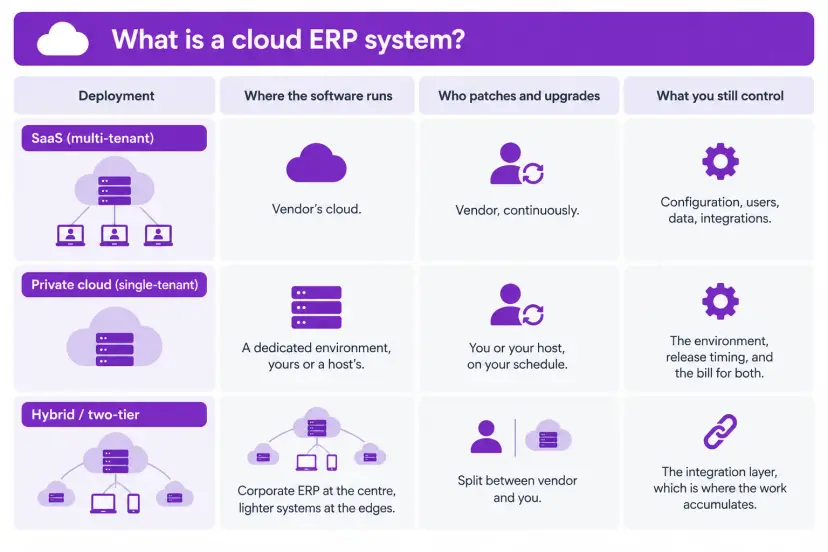
| Deployment | Where the software runs | Who patches and upgrades | What you still control |
|---|---|---|---|
| SaaS (multi-tenant) | Vendor’s cloud | Vendor, continuously | Configuration, users, data, integrations |
| Private cloud (single-tenant) | A dedicated environment, yours or a host’s | You or your host, on your schedule | The environment, release timing, and the bill for both |
| Hybrid / two-tier | Corporate ERP at the centre, lighter systems at the edges | Split between vendor and you | The integration layer, which is where the work accumulates |
If the shared-record architecture is the part you want before the deployment question, the explainer on what ERP actually is covers it; this page stays on the cloud decision.
What a cloud ERP system replaces
A cloud ERP system retires a specific stack, and naming that stack is the fastest way to price the change honestly. On-premise ERP means servers you own, a database licence you renew, an operating system and middleware layer somebody has to patch, and a release upgrade every few years that arrives as a project rather than a maintenance window.
What typically goes away:
- Server hardware and its refresh cycle. Racks, storage, redundancy, and the capital request that lands every fourth or fifth year.
- Database and operating system licences. The line item buyers forget when they compare per-user subscriptions to a licence fee.
- The upgrade project. On-premise, an upgrade is a retest of every customisation. Cloud, it is a vendor release you test on a schedule you do not set.
- Client installs and VPN access. Warehouse and field staff stop needing a tunnel to see stock.
- The backup and disaster-recovery question. It becomes a contract clause instead of a weekly worry.
- The reporting bolt-on. The extra tool that exists because the ERP could not answer a question without an export.
Acumatica’s own explainer frames the same trade as vendor-managed hardware, IT support and system updates, with customers no longer “stuck with infrastructural and ongoing maintenance costs.” Read that as a claim about plumbing, because that is exactly its scope – and it is silent about the rest.
What a cloud ERP system does not replace: master data ownership, process decisions, integration work, and a named internal owner who can say which of two warehouse processes is correct. The subscription covers the first list. Nothing covers the second.
Cloud removes the plumbing. It does not remove the decisions, and the decisions are what overrun budgets.
Cloud ERP vs on-premise: the real differences
Cloud erp vs on premise erp gets argued as a feature comparison, and it is not one. The same modules exist on both sides. The differences that decide outcomes are cash timing, control over change, and who is accountable when something breaks at 2 a.m.
| Dimension | Cloud-based ERP systems | On-premise ERP | What it changes for you |
|---|---|---|---|
| Cash pattern | Subscription from month one; implementation billed separately | Licence up front, plus hardware and database | Cloud front-loads less cash but never stops |
| Ongoing cost shape | Per user, per month, escalating at renewal | Maintenance at 18–22% of net licence a year, plus IT staff | The comparison turns on how many users you add |
| Upgrades | Vendor’s cadence: you test, they deploy | Your project, your window | Cloud limits what you can change; on-premise lets you change anything and retest it forever |
| Release control | Vendor’s | Yours | Regulated processes sometimes need a pinned version |
| Data location | Vendor’s region – read the subprocessor list | Your building | Data-residency rules can decide this alone |
| Customisation | Configuration, APIs, extensions | Any code you like | The freedom is real and priced |
| Access | Browser, any device | VPN or installed client | Field and warehouse staff feel this first |
| Staffing | Vendor’s platform team plus your admin | Infrastructure, database and patching skills | The most underestimated line in the model |
| Exit | Export and rebuild elsewhere | Restore a backup | Ask for a sample export before you sign |
The most repeated number in on-premise cost models is annual maintenance at 18–22% of the net licence fee. Treat it as a negotiation anchor rather than a published standard: the Gartner origin usually attached to the range is looser than the range implies, and the percentage is applied to discount price as often as to list.
On-premise has not become wrong. It has become a smaller share of the cases where it is right: data-residency rules that forbid a vendor region, latency-sensitive plant equipment, heavy customisation that the business genuinely needs, or a data centre with years of life left in it.
What a cloud ERP system costs over three years
Subscription price is the smallest number in a cloud ERP deal, and the only one most pages quote. The table below is the exception in this category: two vendors publish list prices, and everything else in the set is a sales call.
Published list prices, 10 users, annual billing, checked 13 November 2026:
| Plan | Price per user / month | Year 1 | Year 2 | Year 3 | Three-year subscription |
|---|---|---|---|---|---|
| Odoo Standard | $24.90 for 12 months, then $31.10 | $2,988 | $3,732 | $3,732 | $10,452 |
| Odoo Custom | $49.00 for 12 months, then $61.00 | $5,880 | $7,320 | $7,320 | $20,520 |
| Dynamics 365 Business Central Essentials | $80.00 | $9,600 | $9,600 | $9,600 | $28,800 |
| Dynamics 365 Business Central Premium | $110.00 | $13,200 | $13,200 | $13,200 | $39,600 |
Those are the only cloud-based ERP software prices in this set you can budget from without a sales call. The per-user figures come from the vendors’ own pricing pages; the annual and three-year columns are arithmetic, not vendor quotes.
The quote-only vendors are where three-year models go soft. Oracle publishes no list price for NetSuite, SAP routes Business One buyers through partners, and Acumatica publishes package starting points rather than a per-user rate. Third-party cost guides fill the gap and disagree with one another – one 2026 guide reports a median NetSuite contract near $74,747 a year, which is an estimate about other buyers’ deals, not an Oracle figure.
Now the part that decides the outcome:
| Cost line | Cloud ERP (SaaS), modelled | On-premise, modelled | Evidence status |
|---|---|---|---|
| Software rights | Per-user subscription, verified for two vendors, quote-only for the rest | One-time licence fee, not published by any vendor in this set | Partly verified |
| Infrastructure | Included in the subscription | Servers, storage, redundancy, plus a refresh cycle | Vendor claim; no public benchmark |
| Maintenance and support | Included, upgrades included | 18–22% of net licence a year is the rule of thumb, plus internal IT | Rule of thumb, not a published standard |
| Implementation and configuration | Partner or vendor days; scope is the same on both sides | Partner or vendor days; scope is the same | Panorama’s median is nine months; no verified dollar figure in the readable set |
| Data migration and cleansing | Usually the largest surprise relative to budget | Usually the largest surprise relative to budget | No verified public figure |
| Channel, carrier and accounting integration | Per connector, often its own subscription | Per connector, plus server-side middleware you keep alive | Vendor claim |
| Renewal uplift | Annual escalation; get the clause in writing | Maintenance uplift on renewal; same advice | Vendor claim |
| Internal owner’s time | A named person, not a line item | A named person plus the infrastructure skills | Judgement, and the most commonly missed |
Read the two tables together and the first finding is arithmetic: the spread between the cheapest and most expensive published subscription here is close to four times, before a single hour of implementation. The second finding matters more – implementation and migration move the total further than that spread does, which is why a three-year model built only on list prices understates the difference between two vendors.
Three lines are missing from nearly every quote: channel and carrier integration, historical data cleanup, and the internal owner’s time. A total cost of ownership figure without them is a licence comparison dressed as a business case.
How an on-premise to cloud ERP migration runs
A migration is not an installation. The software arrives configured; the business arrives different. The sequence below is a planning model, ordered by dependency rather than by calendar – the order is the reasoning, and the durations are deliberately absent.
| Phase | What it produces | Where it slips |
|---|---|---|
| 1. Data profiling | A count of items, customers, suppliers, open orders, stock by location and units of measure | Nobody books the time, so profiling becomes a side task |
| 2. Fit-gap and process decisions | A written list of what the business will stop doing, and which gaps get configuration versus a habit change | Decisions deferred to the partner, who cannot make them |
| 3. Cleanse and map | One item master, one customer master, documented conversions | Duplicate SKUs and undocumented unit conversions surface here |
| 4. Configure and connect | Every channel, carrier and ledger connected, with sync latency measured in the test tenant | Connectors discovered after the design is signed off |
| 5. Parallel run | Two close cycles side by side, on real transactions | The team keeps working in the old system only |
| 6. Cutover and hypercare | Opening balances, a frozen period, one clean close, a named escalation path | The cutover weekend is planned as if nothing goes wrong |
We hold no measured migration median from our own base, so the honest benchmark is the industry one: Panorama’s median implementation of nine months across 170 organisations. Use it as an outer bound, not as a promise about your scope, and note that it measures the project, not the disruption.
Two mechanics decide whether the nine months holds. The first is a data freeze you can defend: open orders, stock on hand and opening balances all need a single cut point, and the count that produces it has to happen while the warehouse is quiet. The second is sequencing channels – connect one marketplace, run real orders through it, measure the decrement, then connect the next. Sellers who connect four channels in one weekend spend the next month reconciling exceptions they cannot trace.
Migrate the ledger and the stock before you migrate the clever bits. The clever bits are what delay the go-live.
Where cloud ERP stops for multichannel sellers
So is cloud ERP a good fit for online sellers managing orders and inventory? Partly – and the boundary is narrower than vendor pages imply. An ERP is excellent at what happens after an order exists: valuing stock, posting the ledger consequence, consolidating entities, closing a period. It is much weaker at the moment a marketplace order arrives and every other channel needs to know.
The connector list is the first limit. Shopify’s Global ERP Program certifies five vendor-built apps – Oracle NetSuite, Microsoft Dynamics 365 Business Central, Brightpearl by Sage, Acumatica and Infor – and anything else runs through middleware that you map, monitor and pay for. Amazon, eBay, Walmart and TikTok Shop each expose their own inventory and order APIs, with their own limits and their own latency, and no ERP owns all four as a first-class feature.
| Task | Cloud ERP, typically | Channel-native platform, typically |
|---|---|---|
| Stock decrement across Shopify, Amazon and eBay | Via a certified connector or middleware; cadence set by the integration | The core product |
| Listing and offer management per marketplace | Outside the ERP | Often included |
| SKU-level marketplace fee reconciliation | A reporting project | Built in |
| Order routing across locations and 3PLs | Configurable, but heavy | A standard feature |
| Multi-entity consolidation and period close | A core strength | Not the job |
The second limit is what the ERP assumes about an order. ERP order logic is built around one order, one warehouse event, one invoice. Marketplace selling produces partial fulfilments, buyer-initiated cancellations, FBA-style fulfilment the seller never touches, and refunds that arrive weeks after the fee was taken. Each of those is an exception the ERP will record but not resolve.
When buyers search for the best cloud ERP for D2C and multichannel brands, they are usually hunting for one system that is both the ledger and the sync engine. Very few products are honestly both, and the ones that claim to be are usually a platform with an accounting module rather than an ERP with a channel layer.
This section argues from published product behaviour and the connector lists above, not from a client case: which task breaks first depends on your channel mix and your stock depth. The practical test costs nothing – place one real order on each channel during the demo and watch every decrement land in the test tenant.
If the choice is between the two categories rather than between vendors, the comparison of ERP software versus multichannel platforms is the longer version of this argument. If the sync problem is the only one you have, cloud-based inventory software covers what the platform side of that boundary looks like.
Four mistakes that derail a cloud ERP move
These four recur across vendor post-mortems and cost overruns, and none of them is technical.
- Signing the subscription before deciding the process. A fit-gap done after signature is a change request, and change requests are priced by the hour. Decide what the business will stop doing first; the software choice gets easier and the implementation gets shorter.
- Migrating master data you never cleaned. Duplicate SKUs, three spellings of the same supplier, unit-of-measure conversions living in someone’s head. Migration does not create these problems, it schedules them – usually in the week with the least slack.
- Customising the cloud to look like the old system. Multi-tenant releases arrive on the vendor’s cadence, so every custom object is retested against a schedule you do not control. Configuration is cheap, code is a subscription of its own.
- Buying a module checklist instead of testing sync. Most erp cloud solutions shortlists are built on module counts and industry templates, which is why they all look alike. A live test of one order across three channels tells you more than any checklist.
What to ask this week, before any demo:
- Show me a real order from each of my channels, and the decrement on the other two within my latency threshold.
- Which of my channels runs through a certified connector, and which through middleware I will own?
- What is in the renewal clause – percentage, notice period, and what counts as a user?
- What does a full data export look like, and in what format?
- Who on my team owns master data from day one, by name?
Frequently asked questions
What is cloud ERP, and is it the same as cloud-based ERP software?
Yes. Cloud ERP and cloud-based ERP software describe the same delivery model: the vendor hosts and patches the application, the buyer subscribes per user, and access is through a browser. The distinction that matters is deployment shape – multi-tenant SaaS, single-tenant private cloud, or a hybrid of a central ERP with lighter systems at the edges.
Is cloud an ERP system?
No. Cloud is where an ERP system runs, not what it is. An ERP is defined by the shared database and the modules writing to it; the cloud is the hosting and licensing model wrapped around that database. A vendor can sell the same ERP as SaaS, as a private cloud, or as software you install.
What is the best cloud ERP for stock control and warehouse management?
There is no single answer, because stock control splits into two jobs. If you need lot and serial traceability, landed cost, and inventory valuation that satisfies an auditor, an ERP with a strong inventory module earns its place – Business Central and Acumatica both compete there. If the job is knowing what is sellable on each channel right now, a channel-native order and inventory platform does it with less configuration and no nine-month project.
Is cloud ERP cheaper than on-premise over three years?
Usually on cash, not always on total cost. Over three years, the published subscription spread alone runs from $10,452 to $39,600 for 10 users, while on-premise trades a licence fee and hardware for maintenance at 18–22% of net licence plus staff. Three years is short enough that implementation and migration dominate; a five-year horizon favours on-premise more, because the subscription keeps going and the hardware refresh arrives.
How long does a cloud ERP migration take?
Panorama Consulting’s 2026 ERP Report puts the median ERP implementation at nine months across 170 organisations. A migration carries every implementation phase plus a data cutover, so treat nine months as a floor for a mid-sized scope rather than an average, and expect the parallel run to be the phase that moves.
What is Oracle cloud ERP called?
Oracle sells Oracle Fusion Cloud ERP, usually shortened to Oracle Cloud ERP. Oracle NetSuite is a separate product line aimed at mid-market companies, and it publishes no list price either – buyers request a quote.