How do I find out my account number?
Method 1 :
To access your FedEx account number:
- Go to http://fedex.com and select Sign Up or Log In.
- Log in if you haven’t already.
- Select My Profile from the dropdown menu.
- Select Account Management to view your account number.
If your account number is hidden, go back to the Create a Shipment page and select Contact your administrator for assistance.
If you are a registered user of the FedEx Developer Resource Center website, you can find your account number by following these steps:
Or
Method 2 :
- Go to the FedEx Developer Resource Center website at https://developer.fedex.com/api/en-us/home.html.
- Click on the “My Account” link at the top right corner of the page.
- Enter your username and password to log in to your account.
- Once you are logged in, your account number will be displayed on the “My Account” page.
- If you are not yet registered for an account on the FedEx Developer Resource Center website, you will need to create an account first. During the registration process, you will be assigned an account number, which you can then use to access FedEx API services.
How do I find out my meter number?
Method 1 :
To retrieve the meter number associated with your FedEx account, you can follow these steps:
1.Go to the FedEx website at www.fedex.com.
2.Click on “Sign In” at the top of the page.
3.Enter your FedEx account username and password and click “Sign In.”
4.Once you are signed in, click on the “Account Management” tab at the top of the page.
5.In the Account Management section, click on “View Account Profile.”
6.Your meter number will be listed under the “Meter Number” section.
Or
Method 2 :
To find out your meter number from the FedEx Developer Resource Center website at https://developer.fedex.com/api/en-us/home.html, you can follow these steps:
- Log in to your FedEx Developer Resource Center account.
- Click on the “Account” link located in the top right corner of the page.
- Your meter number will be displayed on the Account Information page under the “Meter Number” section.
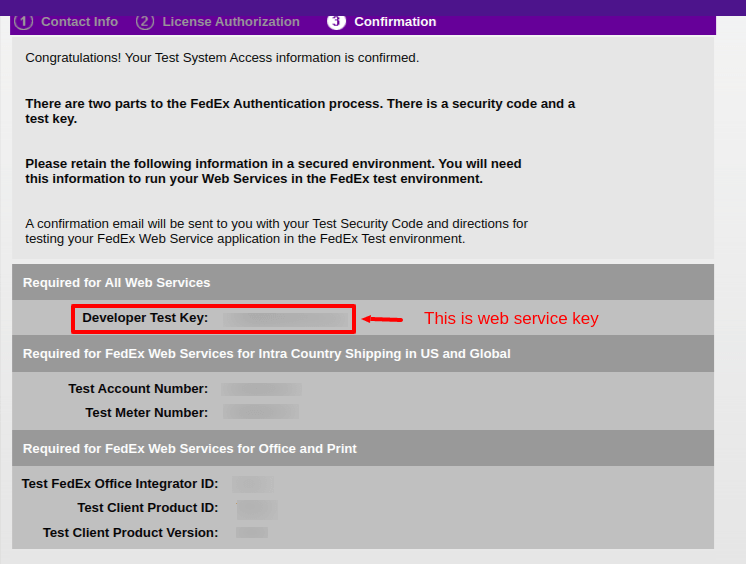
How do I find Web Service Key and Web Service Password ?
In order to obtain your web service key and password for FedEx, you can navigate to the FedEx Developer Resource Center website at https://developer.fedex.com/api/en-us/home.html and follow these procedural steps:
- Begin by logging in to your account on the FedEx Developer Resource Center website.
- From there, locate and click on the “Develop and Test” tab which is located on the top navigation menu.
- Afterward, click on the “Get your test key” button to initiate the process.
- The next step would be to provide the required information in the relevant fields.
- In the second section, you are required to select both the US and Global options.
- Once the appropriate options have been selected, click on the “Continue” button.
- Review and accept the License Authorization.
- Finally, proceed to follow the prompts to complete the account registration process. This should result in the automatic generation of your Developer Key.